

Saving/Loading#
The Load/Save and Exports panels allow saving generated results and load in previously generated results
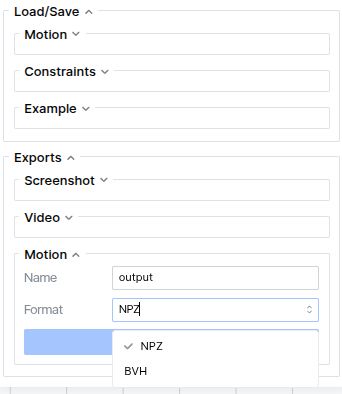
Load/Save
Motion: save the current motion in the NPZ format to a specific path. Motion NPZs can also be loaded into the viewer from this panel. This is useful to load in motions generated with the CLI.
Constraints: save the current constraints in the JSON format to a specific path. Constraint JSON files can also be load into the viewer.
Example: allows saving a new example that encompasses the current motion, constraints, and all settings. This is useful for reloading previous work. If examples are saved to the demo examples directory, they will be loadable from the Examples dropdown menu, otherwise you can load them through file path in this menu.
Exports
Screenshot: save current canvas as an image that can be downloaded through your browser
Video: record the current motion to a video that can be download through your browser
Motion: save the current motion to a format of your choice depending on the loaded skeleton:
SOMA:
NPZorBVHG1:
NPZorCSVSMPL-X:
NPZorAMASS NPZThese formats are described in output formats.