

Constraints#
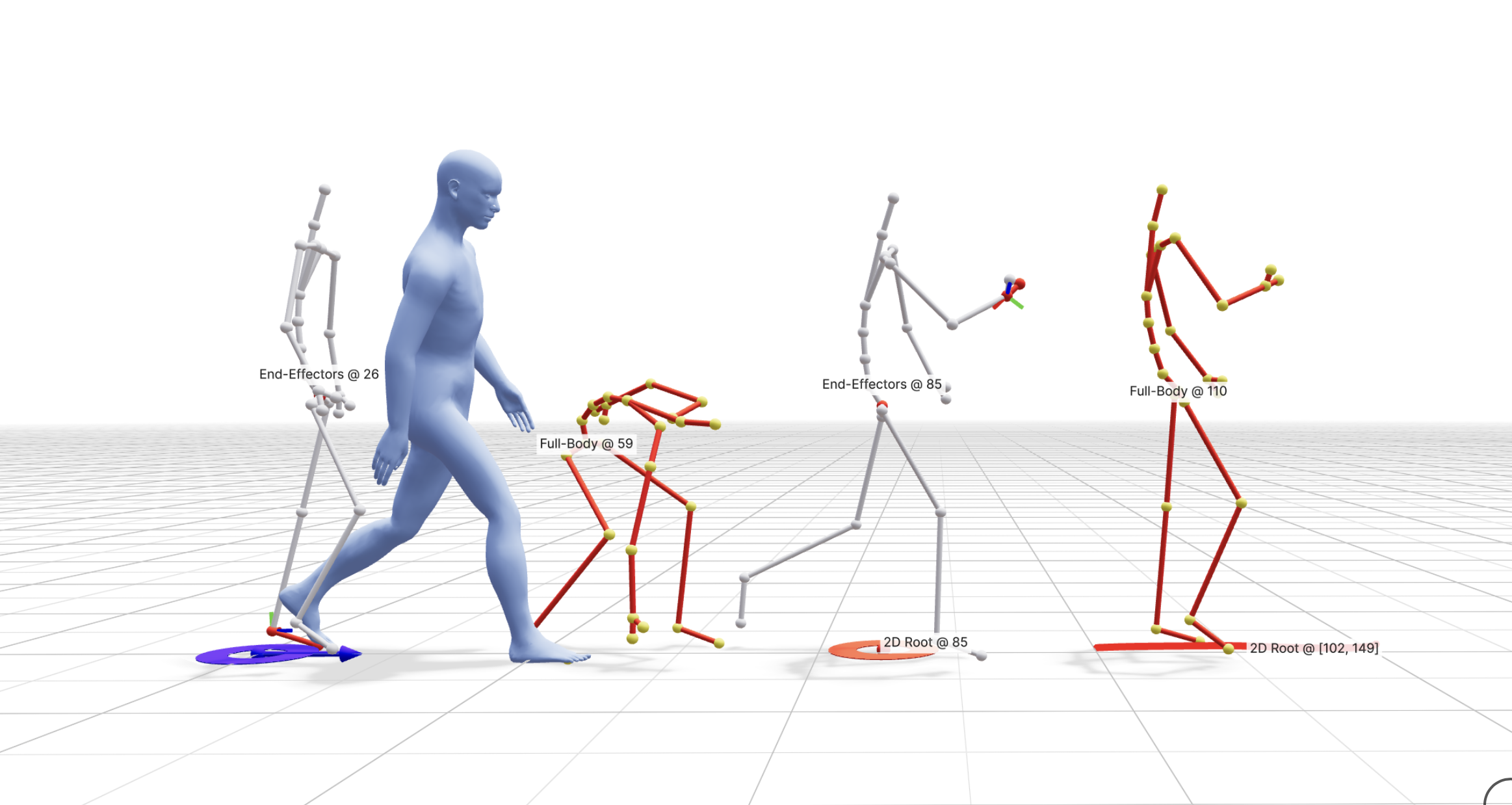
Constraints are time-localized signals that steer the generated motion toward specific spatial goals while keeping the rest of the motion free for the model to resolve. You can combine constraints with text prompts to control trajectory, pose, and end-effectors. Constraints are most easily defined in the interactive demo and can be saved to the JSON format.
Why Constraints?#
Constraints allow you to:
pin the character to a target pose or keyframe
guide a path on the ground while preserving natural motion
fix hands or feet at specific times (for example, touch or contact events)
Constraint Types#
Kimodo is trained to excel at specific types of constraints.
Sparse root 2D waypoint: ground-plane 2D waypoints that guide the global translation of the character. This constrains the 2D components of the smoothed root representation generated by Kimodo.
Dense root 2D path: dense 2D path constraints that guide a continuous trajectory. This constrains the 2D components of the smoothed root representation generated by Kimodo.
Sparse full-body keyframe: full-body pose targets at specific frames. Within the Kimodo motion representation, this constrains the smoothed root position and all body joint positions at a specific frame.
Sparse end-effector constraint: hands or feet targets while leaving the rest of the body flexible. This constrains the smoothed root position along with the specified end-effectors. For hands, this will constrain the wrist position and rotation along with the hand end position. For feet, it constraints the heel position and rotation along with the toe position. Kimodo is trained to support arbitrary subsets of end-effectors.
Foot contacts: toe/heel contact patterns. While the model is trained to support this, it is not currently implemented in the demo UI or Python API.
Note
For SOMA models, constraints may be authored or displayed on the full somaskel77 skeleton, but Kimodo converts them to the reduced somaskel30 representation before passing them to the model. See the skeleton section for more details.
Coordinate Space#
All constraint values are in a Y-up coordinate system with units in meters. The model expects constraints relative to a canonical origin where the root starts at XZ = (0, 0) at frame 0. The initial heading can be set via the first_heading_angle generation parameter (defaults to 0, facing +Z). See the constraints JSON format for full details on each field.
Time and Scope#
In our CLI and demo, constraints can be defined at:
Single frames: keyframe-style constraints
Intervals: guidance across a range of frames
However, as described above, the model is trained to excel mostly at sparse keyframes, with dense keyframes usually only seen for root paths. See best practices for more details.
Post-Processing#
Since it is very challenging for a neural network to strictly adhere to constraints, the demo and CLI support motion post-processing to ensure motion exactly hits constraints. This is done through a lightweight optimization that smoothly adjusts joints while minimizing changes in acceleration and velocity.