
Architecture#
System Overview#
Wheel employs a central HTTP server that manages concurrent access to specialized data stores, where different stores handle different modalities such as trajectories, captions, and labels. It supports multiple concurrent users through a thread-per-request model. A separate WebSocket connection handles real-time viewer events. Compute-intensive tasks such as classifier training and clustering run as managed subprocesses.
Offline preprocessing populates the specialized stores before the server starts. At runtime the server is the single access point: every client sends its requests through it, and the stores are never accessed directly.
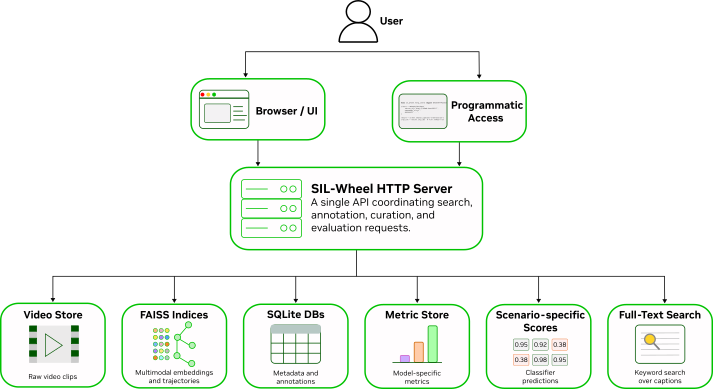
SIL-Wheel system architecture. The browser UI and the Python clients have access to the same data and the same search modes, because both go through a single HTTP server.#
Core Design Principles#
Clip-centric representation: The clip is the common unit across search, annotation, curation, and evaluation. All retrieval methods resolve to clip IDs, so results from any search mode can be used directly for annotation, export, classifier training, or evaluation.
Specialized stores: Different modalities require different backends. Full-text retrieval, vector similarity search, annotation storage, structured filtering, and evaluation state are handled by separate stores chosen for their specific access pattern.
Composable workflows: Search modes, metadata filters, annotations, and evaluation slices can be combined within the same workflow, making it possible to move from broad discovery to targeted curation without leaving the system.
Extensibility: New retrieval methods, annotation types, and evaluation protocols can be added incrementally within the same serving model.
System Architecture#
The server handles HTTP GET requests (pages and data) and POST requests (state mutations). Static HTML pages are served directly from disk. Data endpoints return JSON, which the browser renders client-side. The browser, the natural-language agent, and any programmatic client all use the same HTTP endpoints.
It exposes a single server-mediated interface to multiple clients. The browser is the primary client, providing interactive access to search, annotation, curation, and evaluation workflows. It loads static frontend assets from the server and communicates with backend endpoints for all data access and state-changing operations. A WebSocket connection running alongside the HTTP server is used to push real-time notifications to the browser, for example broadcasting the results of long-running jobs as they complete.
The same HTTP interface is also used by the natural-language agent and other programmatic clients. This keeps interactive and automated workflows aligned: agent-generated searches, browser-based exploration, and other external clients all operate on the same underlying abstractions and server logic. The natural-language agent maps plain-English queries into composed Wheel search requests, optionally using an LLM to rewrite or expand the query before submission. See Agent Interface.
Endpoints fall into four groups: static pages, JSON data (search results, clip metadata, metrics, annotation state, plus Range-served video), CSV exports, and the POST actions that change state, such as annotation writes, label management, auto-labelling, classifier training, and clustering.
Specialized Data Stores#
Wheel uses a separate store for each modality rather than a single monolithic database. Each store is optimized for its specific retrieval or storage task.
Store |
Modality |
Technology |
Purpose |
|---|---|---|---|
Annotation store |
Annotations and metadata |
SQLite |
Per-clip labels (manual and auto-generated) and optional time ranges |
Caption store |
Text captions |
SQLite with full-text search |
Per-clip captions with BM25 keyword retrieval |
Cosmos embeddings store |
Video embeddings |
FAISS |
Text-to-video and video-to-video semantic retrieval |
Caption embeddings store |
Caption embeddings |
FAISS |
Semantic retrieval over caption text |
Visual embeddings store |
Frame embeddings (Florence-2 / SigLIP2) |
FAISS |
Frame-level visual similarity search |
Trajectory store |
Ego trajectories |
FAISS and NumPy |
Shape-based and predicate-based trajectory retrieval |
Perception store |
Object detections |
In-memory NumPy |
Per-clip object counts, distances, and angular positions |
Leaderboard store |
Evaluation metrics |
In-memory NumPy |
Per-model, per-clip metric scores for leaderboard queries |
Search Modes#
Every mode is backed by one of the stores above and resolves to a set of clip IDs, which is what makes them freely composable. Recent results are cached in memory. See Search for the modes themselves.
Evaluation#
Evaluation happens entirely offline. Models are run externally and their per-model prediction files are written into the predictions directory, which the server loads at startup. There is no upload endpoint, so adding a model means placing its files on disk and restarting. See Evaluation for the file layout.
Extending Wheel#
Adding a new search modality follows a consistent pattern:
Create a data store. Implement a store class that loads or builds the index for the new modality (for example a FAISS index, a NumPy array, or a SQLite table) and exposes a retrieval method that returns a ranked or filtered set of clip IDs.
Write a preprocessing script. Build the store from raw data offline, following the same pattern as existing scripts under
scripts/(e.g.extract_video_text_embeddings.pyfor embedding indexes,extract_trajectory_stats.pyfor the trajectory store). The server loads the prepared store at startup.Wire it into the search pipeline. Register the new store in the server and add its retrieval logic to the search method so that it participates in the shared ranking and filter composition that all other modes use.
Because every mode resolves to clip IDs and shares the same result structure, a new modality composes with existing search, annotation, and evaluation workflows with no further changes.
Operational Considerations#
Preparation is separated from serving. Preprocessing, feature extraction, and index construction all happen ahead of time, so the server only has to read prepared indices. That is what keeps interactive latency low at tens of millions of clips.
The server is configured via a YAML file passed on the command line. See Deployment for the full configuration reference.