SIL-Wheel#
SIL-Wheel is a research system for searching, annotating, curating, and evaluating video data at scale. It is designed for model development workflows in which data curation, annotation, benchmarking, and evaluation must work together rather than live in disconnected tools.
For large-scale video model development, progress depends not only on having more data, but on being able to quickly find, validate, and evaluate the right data. Wheel organizes these workflows around a shared clip-centric system, allowing users to move seamlessly from finding data, to validating or labeling it, to measuring model performance on that data, and finally to using those findings to guide the next round of data collection or benchmark design. This closed-loop workflow is central to how Wheel is intended to be used.
Wheel is intended for researchers and engineers developing video-centric models who need to search large datasets, curate targeted slices, annotate examples, and evaluate models on the resulting data.
A typical workflow in Wheel is: search for a scenario of interest, curate or label the resulting clips, turn the slice into a benchmark or training set, evaluate models on that slice, and use the results to guide the next round of curation, model development and benchmark design.
The main differences between SIL-Wheel and other data tools are:
Built for research iteration, not just data throughput: Most data tools focus on operational workflows such as data loading and preprocessing. Wheel is designed to help users identify failure modes, construct targeted data slices, and improve models.
Extensible within a stable framework: Wheel makes it easy to add new retrieval, labeling, and evaluation capabilities without rebuilding the system. It is more flexible than rigid products, while remaining more coherent than a loose collection of scripts.
Unified loop instead of disconnected tools: Search, annotation, curation, benchmarking, and analysis all happen within the same system. This makes the full loop from data discovery to model evaluation faster and more systematic.
Model evaluation is a first-class part of the system: Wheel does not stop at data discovery. Retrieved or curated slices can directly become benchmarks or leaderboard subsets for systematic model evaluation.
Getting Started#
SIL-Wheel goes from a fresh checkout to a fully-loaded UI with a single setup script. Each script runs the complete preprocessing pipeline (video compression, captions, caption and video embeddings, trajectories, and FAISS indexes) and launches the server with every search modality populated. Two public datasets work out of the box.
Prerequisites: the wheel conda env (see the README), ffmpeg, and a CUDA
GPU (developed on a single RTX 4090) with ~15 GB of free disk. On a smaller or
absent GPU, pass --skip-cosmos, --skip-captions,
--skip-caption-embeddings, and/or --skip-visual-embeddings; the server
still boots and those modalities just return empty results.
nuScenes (public mini split, no dataset access required):
# Download the mini split and run every preprocessing stage into ./wheel-data
python examples/getting-started-nuscenes/setup_nuscenes.py \
    --workdir ./wheel-data --admin-password admin

# Start the server from the config.yaml the setup script just wrote
python scripts/launch_server.py wheel-data/config.yaml
Physical AI Autonomous Vehicles (NVIDIA’s dataset, streamed from HuggingFace):
python examples/getting-started-physical-ai-autonomous-vehicles/setup_physical_ai.py \
    --workdir ./wheel-data-physical-ai \
    --camera camera_front_wide_120fov \
    --max-clips 500 \
    --admin-password admin

# Start the server from the config.yaml the setup script just wrote
python scripts/launch_server.py wheel-data-physical-ai/config.yaml
--max-clips names a clip budget and pulls whole chunks from 0 until it is
met. Use --chunks instead to name the chunks yourself. The two cannot be
combined.
Open the printed URL and log in (the setup script creates an admin /
admin user by default). See Deployment for the full walkthrough.
Key Capabilities#
- Multimodal Search
Wheel supports composable retrieval across multiple modalities, making it possible to surface complex scenarios that no single query could express. Available retrieval modes include keyword search over captions, semantic retrieval using text-to-video embeddings conditioned on either text or video, frame-level visual matching conditioned on text or images, search based on ego-trajectory shape or statistics such as curvature or jerk, and structured metadata filters. See Search.
- Annotation and Auto-labeling
Wheel supports per-clip annotation directly from the browser, making it possible to build high-quality datasets efficiently. Users can annotate the timing of an event as well as its value when the annotation is numeric. Users can also auto-label an entire retrieved slice in one click, manage labels at scale through rename, merge, delete, and mass-label operations, and upload annotations from external sources. See Annotation.
- Slice-based Evaluation
Wheel supports project-specific leaderboards for computing metrics on selected data slices. It currently supports evaluation workflows for video generative models, VLMs, and driving policies. Retrieved results can be turned directly into benchmarks, and models can be evaluated on arbitrary slices of data because the same search APIs are exposed within evaluation. Users can upload leaderboards for different model families and evaluate all models in a leaderboard on any slice of data. In addition, Wheel provides an Arena that supports anonymous pairwise preference comparisons with Glicko-2 scoring. See Evaluation.
- Natural-language agent
Wheel includes a standalone agent that translates plain-English queries into composed Wheel searches. This enables hard-example mining and failure-driven data collection without manual filter configuration. See Agent Interface.
- Power Features
Wheel supports multi-step workflows that combine search, annotation, classifier training, and evaluation into iterative loops. These include classifier bootstrapping to scale labels from a small number of examples to millions of clips, hard-example mining from leaderboard results, and failure-driven data collection. See Power Features.
Usage#
After running the setup above, open the URL the server prints (by default
http://127.0.0.1:8012/) and log in with the admin account the setup script
created. Teams running a shared deployment can instead point users at that
server, where new accounts require admin approval.
Once logged in, users can search the video dataset using any combination of search modes, inspect clips together with captions, trajectories, bird’s-eye- view visualizations, and annotations, label clips manually or auto-label an entire result set, and evaluate model performance on arbitrary data slices through the leaderboard.
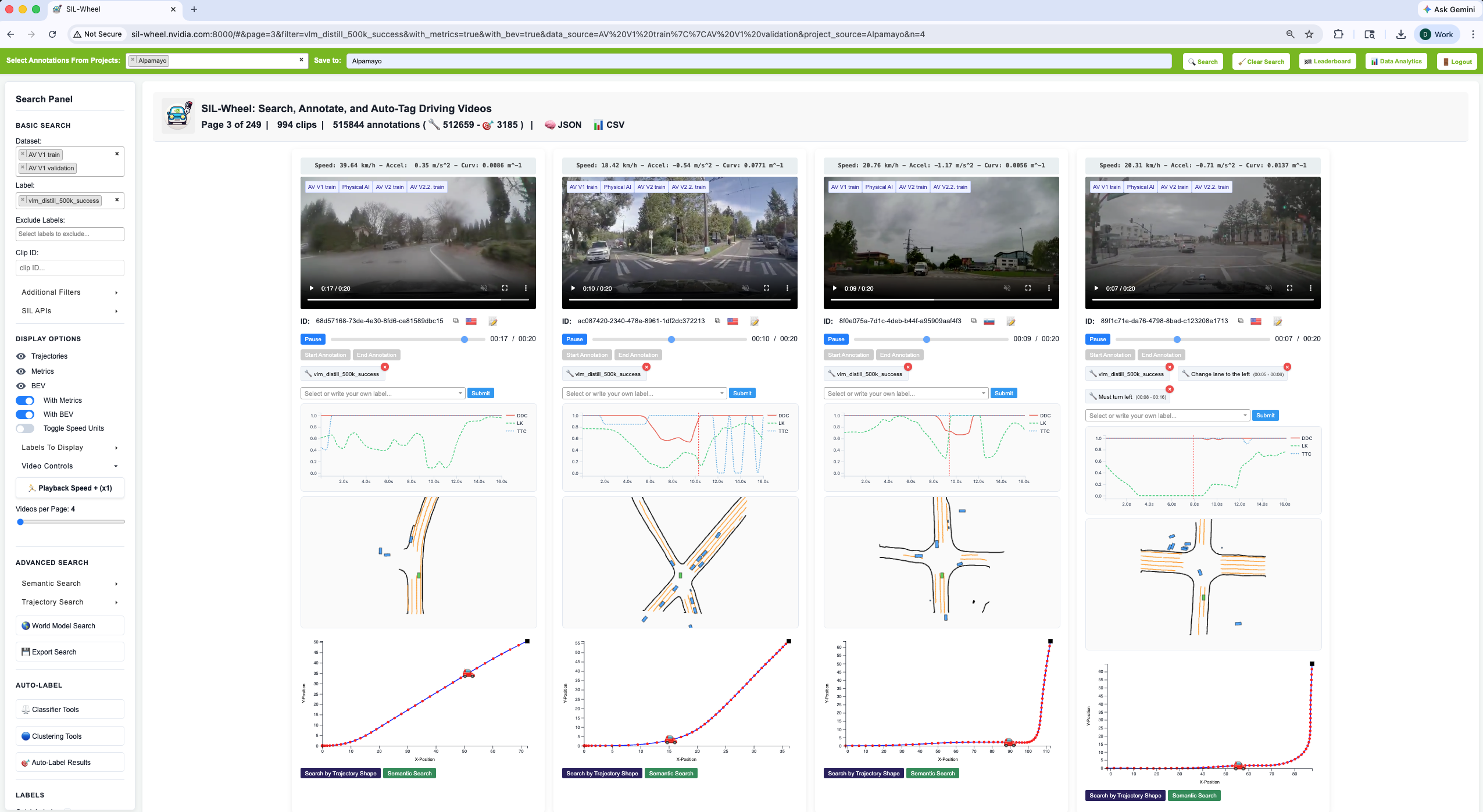
The main interface with the metrics and BEV display options enabled, so each result shows its driving signals alongside the video.#
The current search state is encoded in the URL hash. As a result, copying the URL preserves all active search modes, filters, and parameters, making it easy to bookmark a search or share it with a colleague. See Search URLs for the full URL structure and the parameter that corresponds to each search mode.
To run Wheel on your own dataset or to develop and test new features, see Deployment. It runs comfortably on a single desktop GPU (the reference deployment uses one NVIDIA 4090), so it does not require expensive infrastructure.
For scripting against Wheel from notebooks or batch jobs,
the same search pipeline is exposed through Python clients: a local
WheelClient that runs the pipeline in-process and a remote
WheelHTTPClient that talks to a running server. See
Programmatic API.