
Search#
Retrieval APIs: the entry point to everything else in Wheel. Each mode defines a slice of the corpus; several can be composed in one query.
Wheel provides multiple composable search modes that can be combined within a single query. These modes let users define slices using language, visual content, motion, classifier outputs, metadata, and structured scene constraints.
Start here whatever you are ultimately trying to do. Annotation, curation, and evaluation all take the current search result as their input, so defining the right slice is the first step of every workflow.
If you do not yet know what to search for, begin with Cluster Search, the one mode that needs no query: it surfaces the natural structure of a dataset and shows you what is there to ask about.
Combining Modes#
Search modes fall into two categories:
Ranked modes assign each candidate clip a similarity, relevance, or probability score. Results are sorted in descending order by the active ranked mode that controls ordering.
Filter-only modes restrict the eligible pool without producing a score of their own. Only clips that satisfy every active filter remain in the result set.
Filter-only modes apply first to define the candidate pool. Ranked modes then score and order the remaining clips. If no ranked mode is active, results are returned in arbitrary order.
When multiple ranked modes are active, Wheel uses a fixed priority order to determine which score controls final sorting:
Numeric metric -> Classifier -> Caption embedding -> Semantic text -> Semantic clip -> Visual (text) -> Visual (image) -> Trajectory shape -> Cluster distance
For example, combining semantic text search with a perception-based filter returns only clips that satisfy the specified spatial constraint, ranked by semantic similarity. Replacing the semantic search with a classifier ranks the same filtered pool by classifier score instead.
Search Modes at a Glance#
Search type |
What it retrieves |
Behavior |
|---|---|---|
Caption keyword |
Clips whose captions contain matching words or expressions |
Filter |
Caption embedding |
Clips whose captions are semantically similar to a textual query (Qwen3 embeddings) |
Ranked |
Semantic text-to-video |
Clips visually and semantically similar to a text description (CosmosEmbed1) |
Ranked |
Semantic video-to-video |
Clips visually and semantically similar to a reference clip (CosmosEmbed1) |
Ranked |
Visual |
Clips with frames that match a text description or uploaded image (CLIP); ranked by best-matching frame |
Ranked |
Trajectory shape |
Clips with an ego-trajectory shape geometrically similar to a reference clip |
Ranked |
Trajectory pattern |
Clips matching a named ego-trajectory pattern or custom motion expression |
Filter |
Perception-based |
Clips where specific objects appear at a given proximity or direction |
Filter |
Classifier |
Clips scored above a threshold by a trained scenario-specific classifier |
Ranked |
Cluster |
Clips belonging to a precomputed cluster, ranked by centroid proximity |
Ranked |
Metadata |
Clips matching annotation labels, data source, geography, or numeric metrics |
Filter / Ranked * |
* Metadata is filter-only except when a numeric metric sort is configured, in which case results are ranked by that metric value.
Not every mode is available on every deployment. Each one depends on artifacts built during preprocessing, and a mode whose artifacts are missing is hidden rather than returning nothing. What Each Search Mode Needs lists what each requires.
Examples#
Trajectory shape + semantic video-to-video
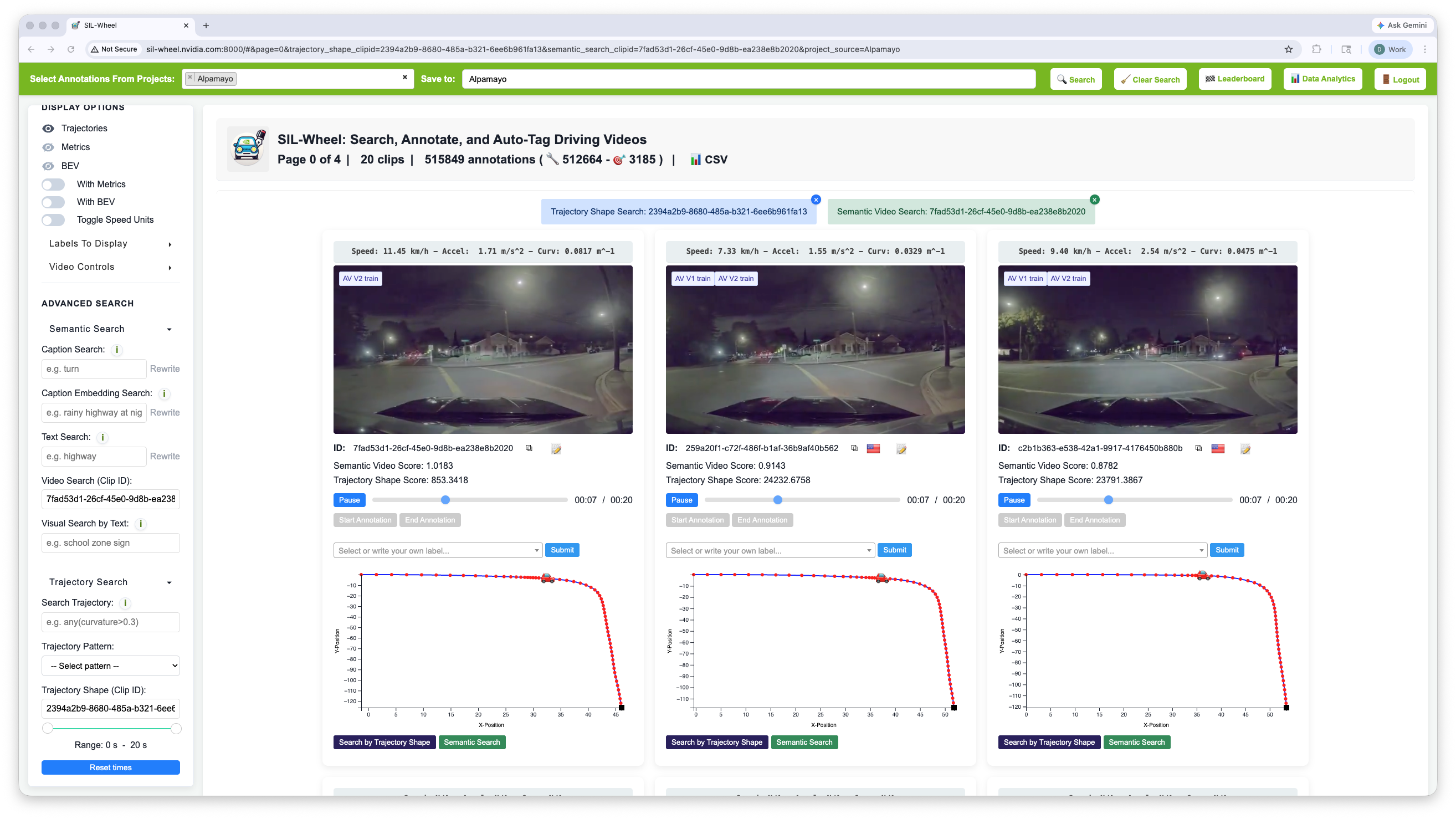
Trajectory shape search combined with semantic video-to-video retrieval.#
Find a reference clip with an interesting manoeuvre, then run trajectory shape search to retrieve clips with a geometrically similar path. Add a semantic video-to-video search using the same reference clip to further rank the results by visual similarity. The result is a pool of clips that both drive a similar path and look like the reference scene.
Trajectory pattern + metadata
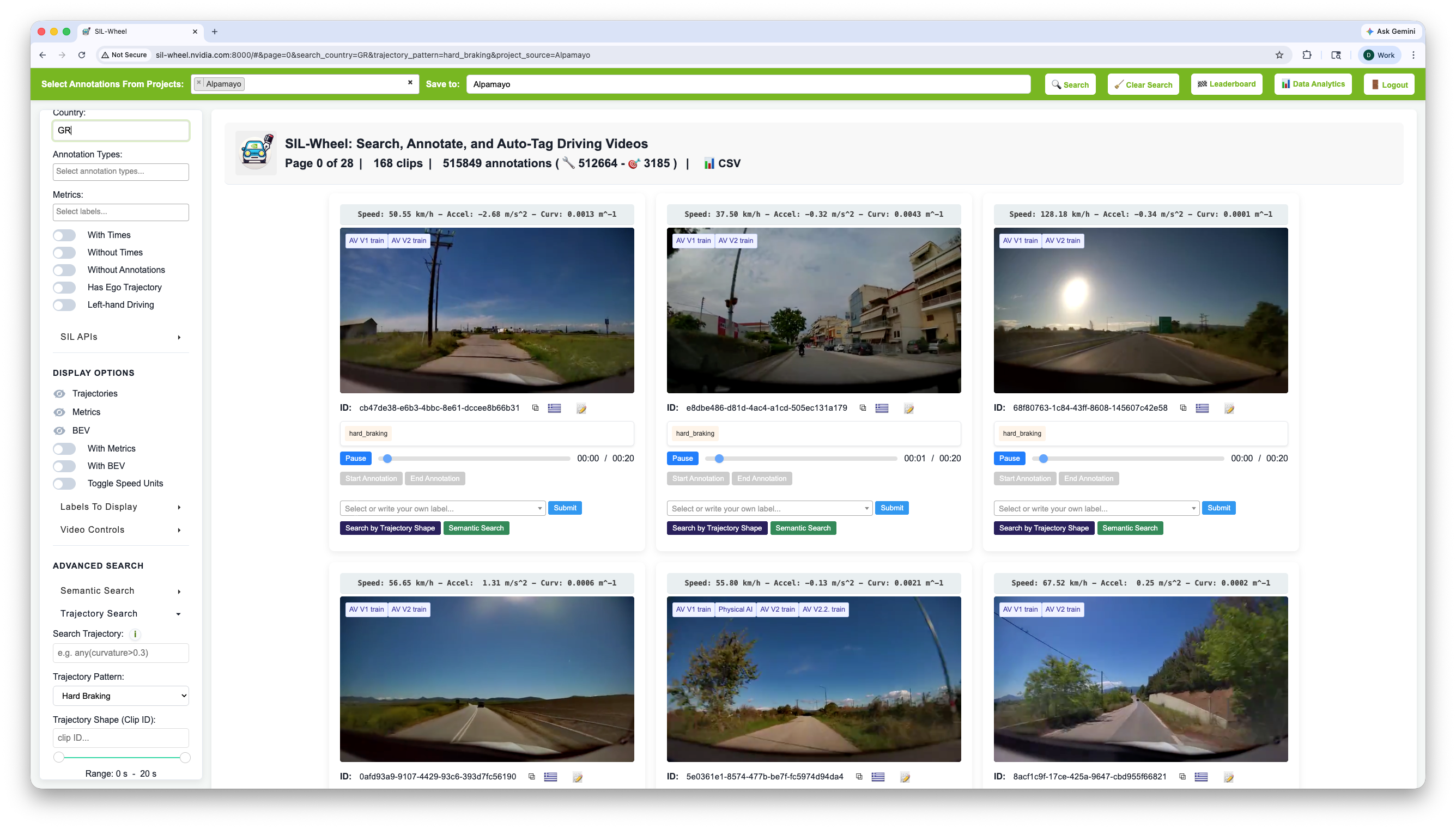
Trajectory pattern filter (Hard Braking) combined with metadata constraints (country Greece).#
Use a trajectory pattern filter such as hard_braking or a custom
expression to restrict results to clips with a specific motion
characteristic. Combine with metadata filters to scope the search to a
particular dataset, country, or annotation label. Because both are
filter-only modes, the result is an unranked set of clips satisfying all
constraints simultaneously, which can then be annotated or exported
directly.