
Semantic Search#
Search mode: meaning-based matching against video embeddings of the clip itself, rather than any text about it.
Semantic search retrieves clips using video-level embeddings. Unlike caption-based search, it matches against the clip representation itself rather than the associated text, so it can return relevant clips even when the captions use different wording or omit the concept entirely. It supports two modes: text-to-video, where a text query is matched against clip embeddings, and video-to-video, where a reference clip is used as the query. Both modes can be active simultaneously.
Reach for it when the property you care about is visual and may never have been written into a caption. Use video-to-video when you have a strong reference example but cannot describe it precisely in words, or when you want to grow a small seed set into a larger slice of similar clips.
Reach for something else when the concept is reliably captured in text, where Caption Embedding Search searches the descriptions rather than the pixels, or when the target is a specific object visible in a single frame, where Visual Search matches frame by frame.

Semantic text-to-video search for a car stopping behind a school bus.
Results are clips whose video content matches the description regardless
of how they are captioned.#
How It Works#
Offline indexing. Each clip is encoded offline into a 768-dimensional embedding using Cosmos-Embed1, which maps video and text into a shared embedding space. A text description and a visually matching clip end up close to each other in this space regardless of how the clip is captioned. Vectors are L2-normalised and stored in a FAISS IVF index (one entry per clip), so nearest-neighbour search is fast regardless of dataset size.
Text-to-video. The query text is encoded by the same CosmosEmbed1 model into a vector in the shared space. FAISS returns the clips whose video content is nearest to it by cosine similarity. A query like “pedestrian holding an umbrella” can retrieve matching clips even when that phrase does not appear in the captions.
Video-to-video. A reference clip’s embedding is looked up directly from the index and used as the query vector. FAISS returns the clips that are closest to it. To use this mode, click Semantic Search on any clip card in the UI and the selected clip becomes the query automatically. The reference clip itself always appears first in the results, followed by the most similar clips in descending order.

Semantic video-to-video search using a reference clip. Results are visually and semantically similar clips retrieved directly from the reference embedding.#
Text-to-video and video-to-video can be used together. Each produces its own score for a clip. When both are active, the ranking follows the global search-mode priority described in Search.

Text-to-video and video-to-video semantic search active simultaneously. Each clip is scored against both the text query and the reference clip embedding.#
Query Rewriting#
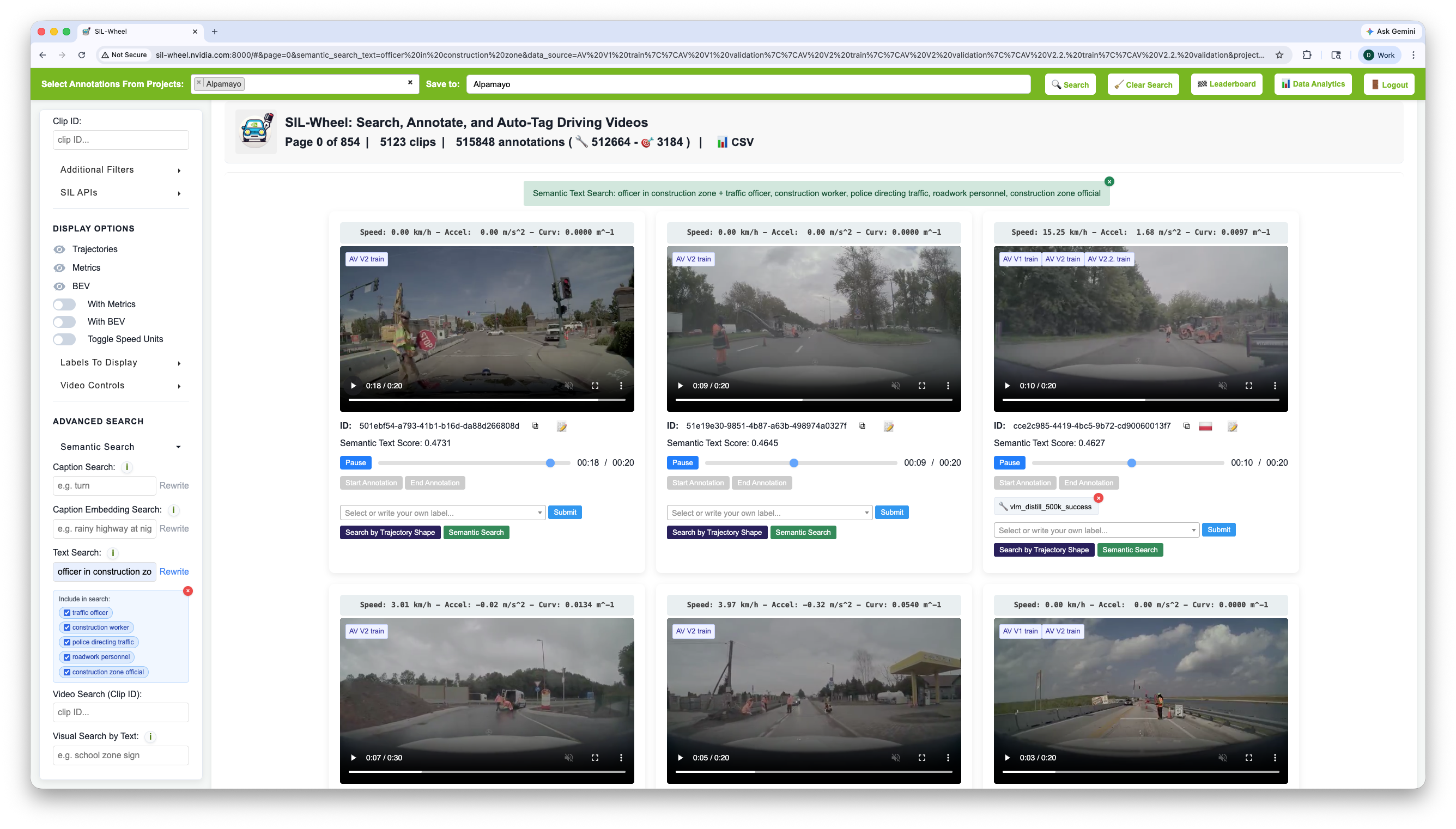
Query rewriting expands the text query into alternative phrasings, each shown as a checkable tag in the UI.#
Query rewriting applies to text-to-video queries only. Video-to-video mode uses a clip embedding directly and cannot be rewritten. Clicking Rewrite sends the query to a language model that generates alternative phrasings of the same concept: synonyms, related terms, and descriptions using different vocabulary. The system runs a separate search for each rewritten variant, deduplicates the results, and keeps the best score for each clip.