
Trajectory Search#
Search mode: retrieval by how the ego vehicle moved, either the shape of its path or statistics over that motion.
Trajectory search retrieves clips using ego-vehicle motion. It supports two modes: shape search, which finds clips whose ego path is geometrically similar to a reference clip, and pattern search, which filters clips by evaluating expressions over motion statistics such as speed, acceleration, and curvature. Shape search is a ranked mode; pattern search is filter-only. Both require ego trajectory data.
Reach for it when the manoeuvre matters more than the scenery. Use shape search when you have a reference clip with an interesting manoeuvre and want geometrically similar paths. Matching is speed-invariant, so the same curve driven slowly still qualifies. Use pattern search to filter by a named behaviour such as hard braking, swerving, or a prolonged stop.
Reach for something else when what you care about is in the scene rather than the ego motion, or when the dataset carries no ego trajectories, since neither mode returns anything without them.
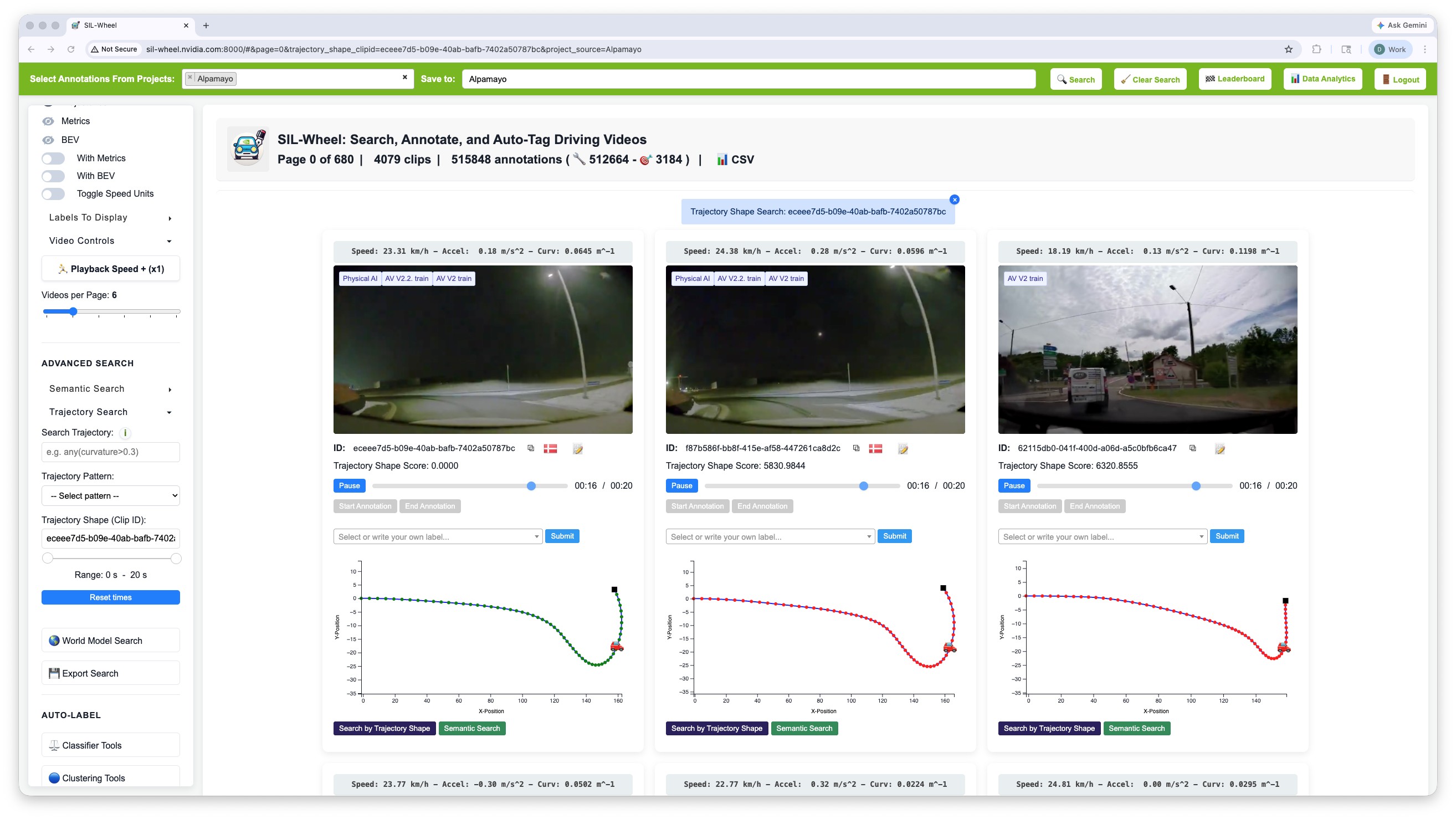
Trajectory shape search: clips with similar geometric path to a reference clip.#
Shape Search#
Finds clips whose ego path has a similar geometric shape to a reference clip. Trajectories are normalised to their starting position, so the comparison is purely about shape: the same curve driven at different speeds will match. A time window can be specified to restrict the match to a sub-segment, allowing search for a specific manoeuvre without requiring the full path to match. Shape search is a ranked mode.
Pattern Search#
Pattern search filters clips by evaluating expressions over per-clip motion statistics. For each clip, the following scalar arrays are precomputed from the ego trajectory, with one value per timestep sampled at 10 Hz:
Variable |
Description |
|---|---|
|
Ego speed in m/s |
|
Ego speed in km/h |
|
Longitudinal acceleration in m/s² (negative = braking) |
|
Rate of change of acceleration in m/s³ |
|
Path curvature at each timestep (higher = sharper turn) |
Expressions can reference any of these arrays using standard mathematical
and logical operations. This is equivalent to writing a Python expression
in an interactive notebook: the expression is evaluated against each clip’s
arrays and the clip is included in results if the expression evaluates to
True. Aggregate functions such as sum(), mean(), max(),
min(), and any() are available, as are element-wise comparisons.
Examples:
mean(speed) > 20
max(curvature) > 0.2 and mean(speed) > 10
sum(acceleration < -3.0) > 10
any(speed < 0.5) and any(speed_kph > 50)
Predefined Patterns#
The following named patterns are available as shortcuts in the UI. Selecting one is equivalent to entering the corresponding expression:
Pattern name |
Expression |
Description |
|---|---|---|
|
|
Sharp turning sustained over at least 1 second |
|
|
Speed transitions from near-stop to moving (stop precedes go) |
|
|
Strong deceleration sustained over at least 1 second |
|
|
Stationary for more than 15 seconds |
|
|
Clip starts stationary and reaches open-road speed (idle precedes cruise) |
|
|
Sharp lateral movement at highway speed |
|
|
Ego vehicle is in motion for at least 1 second |
Custom expressions can be entered directly in the Custom motion filter field and support the same syntax and variables as the predefined patterns.