
Deployment#
This page explains how to deploy SIL-Wheel on a custom video dataset. Getting started requires running a set of pre-processing scripts to compute embeddings and other indexes for your data, then pointing the server at the resulting artifacts via a YAML configuration file. The server is modular: every datastore is optional, and the search modes that depend on a missing store are automatically disabled at startup.
Quick Start on a Public Dataset#
The fastest way to see what a working Wheel deployment looks like is to run the bundled examples/getting-started-nuscenes/ script. It downloads the public nuScenes mini split (10 scenes, no AWS account required), runs every preprocessing stage end-to-end, and starts a server with caption full-text search, Cosmos text-to-video, Qwen3 caption embeddings, Florence-2 + SigLIP2 visual search, and trajectory pattern + shape search all wired up. End-to-end takes roughly two hours on a single RTX 4090. A few features are intentionally skipped because they require additional artifacts: the BEV viewer, classifier and cluster search, the Arena, and VLM Judge stay disabled until their respective stores are populated.
A second example,
examples/getting-started-physical-ai-autonomous-vehicles/,
runs the same stages against NVIDIA’s Physical AI Autonomous Vehicles dataset.
It streams the data from the Hugging Face Hub rather than downloading a split
once, so --chunks and --max-clips control how much is processed and the
run scales from a smoke test to a corpus of any size. The dataset is gated, so
accept its licence on Hugging Face and log in first.
Either script verifies the toolchain on a fresh machine before you bring up Wheel on your own data. nuScenes is the shorter path; Physical AI is the closer analogue to a real deployment, since it is large enough that you choose how much of it to ingest.
Pre-processing#
Standing up Wheel on a custom dataset involves five offline stages, each
backed by a script under scripts/ in the wheel repository. The
examples/getting-started-nuscenes/ script linked above runs all five
against the public nuScenes mini split and is the fastest way to see what
each stage produces.
Note
What follows is a summary. The full reference is docs/data-preparation.md in the wheel repository: exact S3 commands, schema migrations, dataset registration, country codes, FAISS index update snippets, and the supported input formats for each source. Read it before preparing real data; the five stages below are the map, not the territory.
Process videos (
scripts/prepare_data.py). Downscales raw clips, re-encodes to H.264/AAC with faststart, and shards work via--n_processes/--process_id. Inputs are a list of.mp4or.tarpaths, local or S3.Upload to S3 and register clips.
aws s3 sync(ors5cmd) the processed videos to the configured bucket, then upsert each clip’sclip_id → relative_s3_pathinto thevideo_pathsandclipstables of the annotations SQLite, plus register the dataset’s category and license in thedatasetstable.Compute embeddings. Three independent extraction passes over the same video list:
scripts/extract_video_text_embeddings.pyfor Cosmos text-to-video embeddings (powers semantic search).scripts/extract_florence2_sigclip_embeddings.pyfor Florence-2 region crops encoded with SigLIP2 (powers visual search).scripts/extract_captions.pyfollowed byscripts/extract_captions_embeddings.pyto produce captions and then their Qwen3 embeddings (powers caption FTS and caption embedding search).
Each step appends its shards to the corresponding FAISS index.
Compute trajectories (
scripts/extract_trajectory_stats.py). Produces per-clip safetensors, which are then assembled into the FAISS indices for the full-length, 10-second, and 5-second windows.Point the YAML at it. Copy
config/wheel_launch_prod_server_config.yaml, replace every*_dirand*_dbpath with your local equivalents, and launch the server (see Launching the Server below).
What Each Search Mode Needs#
Every mode is backed by its own artifacts, and a mode whose store is missing from the config is hidden at startup rather than failing at query time. That is usually what an empty or absent search mode means.
Search mode |
Config key |
Built by |
|---|---|---|
|
|
|
|
|
|
|
|
|
|
|
|
|
|
|
|
A 3D object detector run offline; not shipped with Wheel |
|
|
Trained in the UI, or |
|
|
Run from the UI, or |
|
Metadata Search (labels, source, geography) |
|
|
Metadata Search (numeric metrics) |
|
Model predictions written externally |
Three non-search features follow the same rule: the BEV viewer needs
bev_store (index_available_bev_metrics_files.py), the Arena needs
arena_db, and the chat assistant needs agent_url
(see SIL-Wheel Docs Agent).
Trajectory search is the one worth watching, because its coverage can be partial rather than absent. If some clips carry ego trajectories and others do not, the mode works but silently searches only the clips that have them. The Has Ego Trajectory filter in Metadata Search shows which those are.
Configuration#
The server is configured via a YAML file with two top-level sections:
datastores and server.
datastores:
  annotations_db: /path/to/annotations.db
  captions_db: /path/to/captions.db
  users_db: /path/to/users.db
  arena_db: /path/to/arena.db   # optional, enables the Arena

  trajectory_store:
    trajectory_dir: /path/to/trajectories/

  cosmos_embed_store:
    embeddings_dir: /path/to/cosmos_embeddings/
    index_spec: "IVF4096,PQ96x8"

  visual_embed_store:
    embeddings_dir: /path/to/visual_embeddings/
    index_spec: "IVF4096,PQ64x8"   # optional, this is the default

  caption_embed_store:
    embeddings_dir: /path/to/caption_embeddings/
    index_spec: "IVF4096,PQ128x8"   # optional, this is the default

  wm_store:
    data_file: /path/to/wm_stats.parquet

  predictions_store:
    predictions_dir: /path/to/predictions/

  classifier_search:
    classifier_dir: /path/to/classifiers/

  cluster_search:
    clustering_dir: /path/to/clustering/

  bev_store:
    s3_bucket: processed_data
    metrics_index_dir: /path/to/bev_index/

server:
  bindto: "0.0.0.0:8000"
  debug: false
  llm_provider: "auto"          # "auto" | "openai" | "local"
  vlm_provider: "auto"          # "auto" | "openai" | "local"
  vlm_judge_workers: 20         # parallel workers for arena VLM judging
  agent_url: "http://agent-host:8765"   # optional, enables docs chatbot
  bug_report:
    spreadsheet_id: "<google-sheets-id>"
    credential_path: /path/to/service_account.json
The optional keys above behave as follows. arena_db enables the
Arena (see Arena); when absent, the Arena page is
disabled. llm_provider selects the backend for query rewriting and
vlm_provider the backend for arena VLM judging; both take the same
values. auto picks the first provider whose credentials are present
in the environment (openai → local), while openai and
local force a specific provider. local runs through a local
model so no API key is required.
vlm_judge_workers controls how many requests the VLM judge
dispatches in parallel.
agent_url points at a running SIL-Wheel docs agent server and
enables the in-browser onboarding assistant described below.
Slack integration for bug reports is configured out-of-band through a
~/.slack/config and ~/.slack/credentials profile on the server
host rather than via the YAML.
A reference config is provided at
config/wheel_launch_dev_server_config.yaml.
Installation#
1. Create the conda environment (from the repository root):
conda env create -f environment.yml
conda activate wheel
2. Build C extensions and install the package:
python setup.py build_ext --inplace
pip install -e .
3. Install S3 access tools (required for video streaming):
pip install awscli
Note
Do not install flash-attn. There are known compatibility issues
with CUDA 13.0 and PyTorch 2.11. PyTorch’s built-in attention is used
instead.
Note
PE-Core (the pe_core_* embedding types in
extract_video_text_embeddings.py) needs Meta’s
perception_models
package. Install it after the conda environment is set up, and with
--no-deps — otherwise its transformers pin clobbers the version
this project depends on:
pip install --no-deps git+https://github.com/facebookresearch/perception_models.git
Skip this step if you don’t plan to extract or evaluate pe_core_*
embeddings.
Launching the Server#
The server is designed to run on a single workstation with a GPU. The reference deployment uses a desktop with an RTX 4090.
python scripts/launch_server.py <config.yaml> [--override KEY=VALUE ...]
The --override flag accepts dot-notation keys to override any config value
without editing the file:
python scripts/launch_server.py config.yaml --override server.bindto=0.0.0.0:9000
Usage Analytics#
Wheel includes a built-in analytics dashboard that tracks usage over time. It shows the number of active users, search queries performed, and other activity metrics, making it easy to understand how the system is being used across teams.
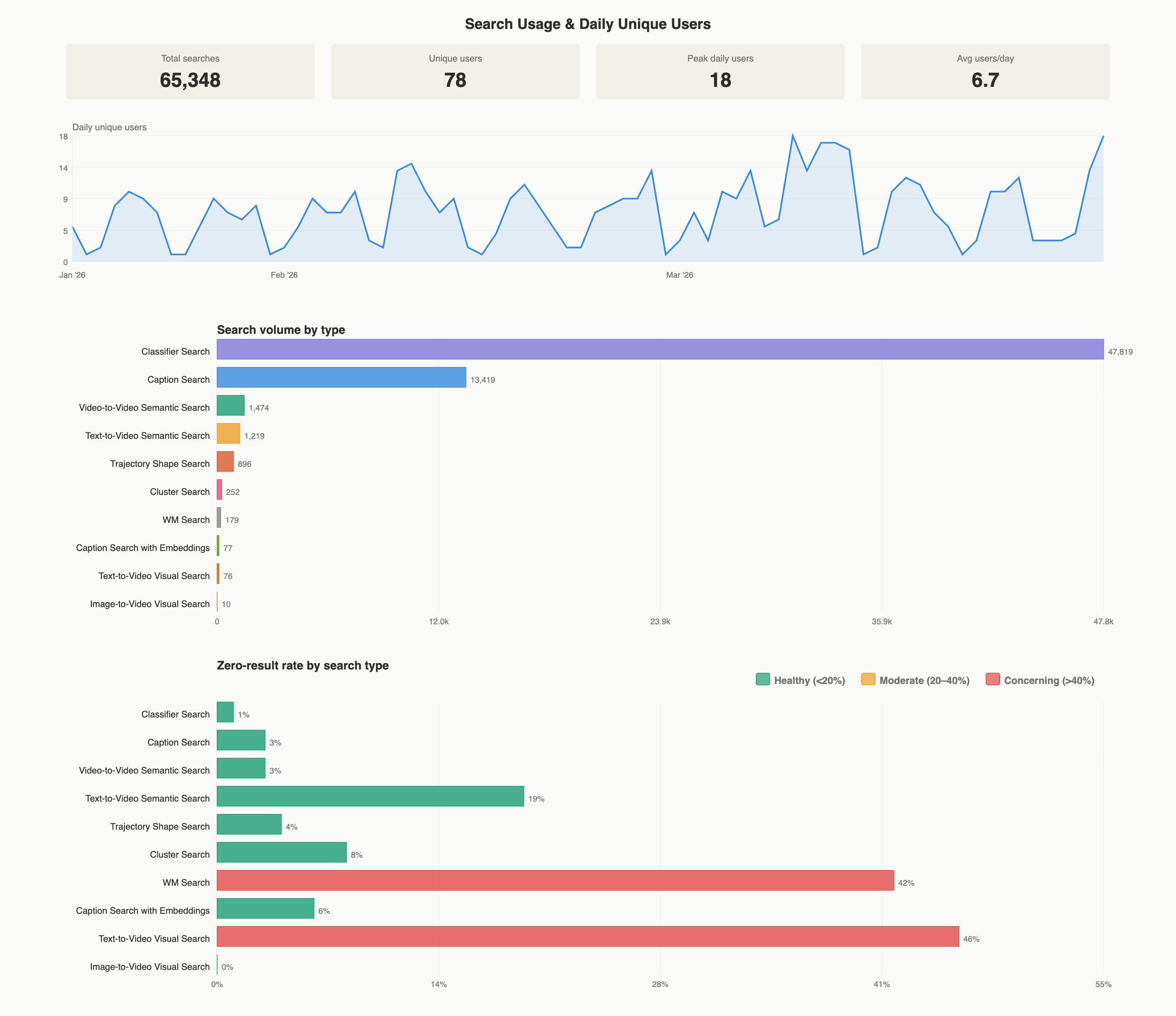
The usage analytics dashboard on April 1st 2026: search totals and daily unique users, volume broken down by search type, and the zero-result rate for each, flagged healthy, moderate or concerning.#
Credentials#
Caption embedding search requires authenticating with Hugging Face to download Qwen3-Embedding-8B:
pip install --upgrade huggingface_hub
hf auth login
Query rewriting is always enabled. When llm_provider is set to
auto, the server tries providers in order:
OPENAI_API_KEYfor the OpenAI providerA local LLM fallback that requires no API key
The Rewrite buttons stay visible regardless of which provider is selected.
Set llm_provider explicitly in the YAML to bypass auto-detection.
User authentication is always enabled and the users_db key is
required. Create an initial admin user directly in the users_db
SQLite database before the first launch.